
Action Items
Action Items are the execution layer of TensorPM.
If Action Items are outdated, Guidance quality and planning accuracy drop immediately.
Action item lifecycle fields
Core fields in the current data model include:
- status (
open,inProgress,blocked,completed) - priority (user + AI-supported display logic)
- due/start dates
- complexity, impact, urgency
- assignees
- planned and actual effort/budget
- dependencies and block reason
- optional recurring source link
Views
The Action header has three main tabs:
- List
- Board
- Recurring
When Board is active, you choose:
- Kanban (status flow)
- Priority (priority buckets)
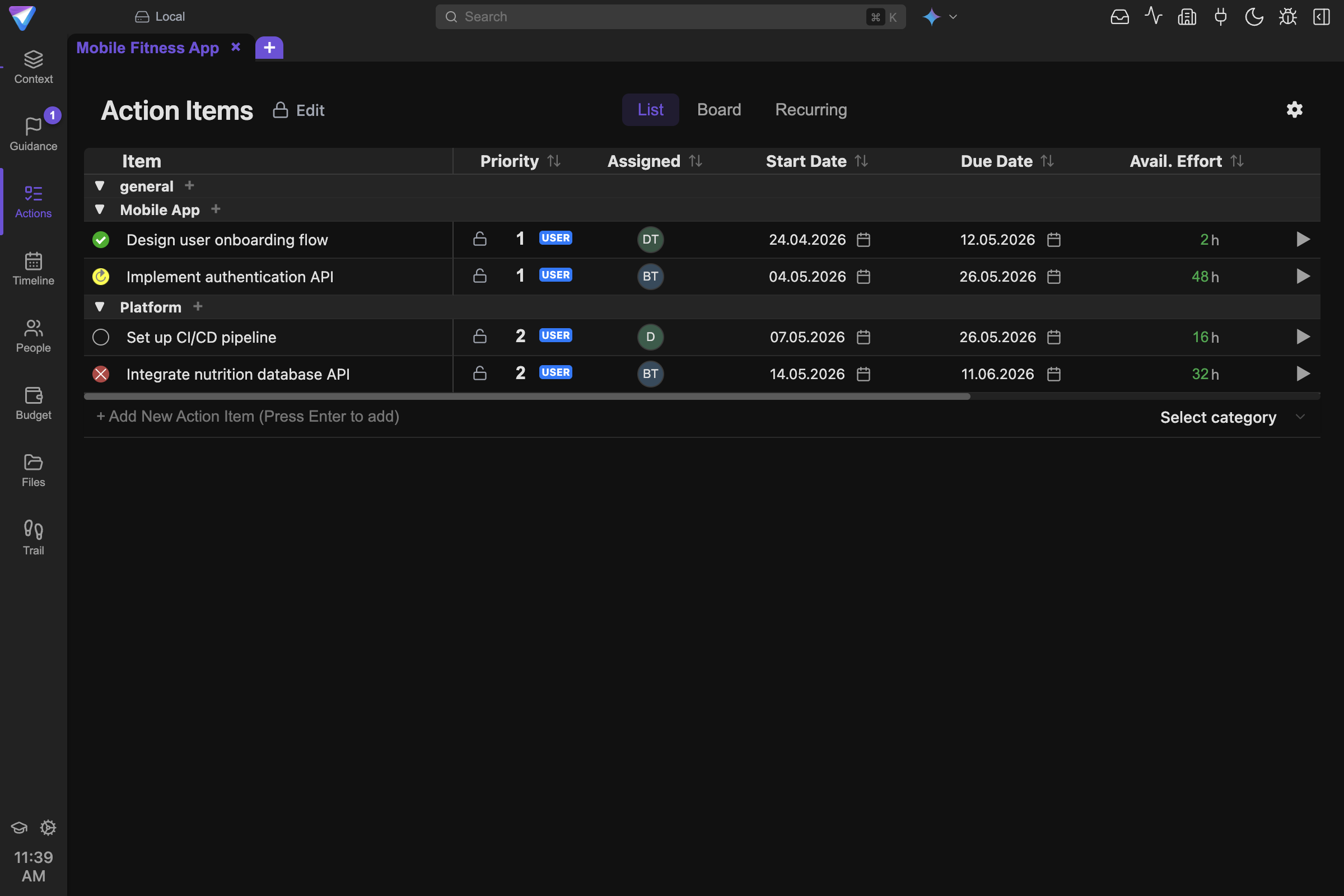
The list view is the working surface for daily execution tracking and quick plan maintenance.
View-specific behavior
Editmode toggle is available inList(not in board views).Hide Completedin the gear menu is available inListandPriority.KanbanandPriorityare drag-oriented board workflows.
Edit mode and selection
In List, use the edit toggle (Use / Edit) to enable multi-select workflows.
Selection is required for item-based AI actions like:
- Re-evaluate
- Split
Filters and sorting
The list supports rich filters and sort controls, including:
- text search
- status, priority, impact, complexity, urgency
- assignee
- start/due date
- effort and budget fields
You can also hide or show columns in edit mode.
Dependencies
Dependency types supported:
- FS (Finish-to-Start)
- SS (Start-to-Start)
- FF (Finish-to-Finish)
- SF (Start-to-Finish)
Dependencies can be used for execution order and planning checks.
Recurring actions
The Recurring view lets you define repeating work templates with:
- recurrence interval (day/week/month/year)
- start and end dates
- category, urgency, complexity, impact
- assignees and planned effort/budget
Validation behavior in recurring forms:
- item text is required
- start date is required
- end date is required
- end date must not be earlier than start date
Time and effort tracking
Action items support timer-based and manual effort tracking plus planned/actual budget tracking.
Recommended operating cadence
- Keep statuses fresh daily.
- Resolve blocked items quickly with explicit block reasons.
- Re-run Guidance after significant scope/time/risk changes.
- Use Quick Actions for bulk re-evaluation when context changes.
Next steps
- Priority and checks: Guidance
- AI acceleration: AI Panel & Quick Actions
- Overall layout: Navigation & Views