
Konto & KI-Modi
Kurz gesagt
TensorPM trennt zwei Entscheidungen, die oft verwechselt werden. Die erste: Wo liegen deine Projektdaten und wer darf sie sehen. Die zweite: Welcher KI-Dienst darf für dich arbeiten.
Beides stellst du getrennt ein. Du kannst ein Projekt rein lokal halten und trotzdem KI nutzen. Du kannst TensorPM auch komplett ohne KI verwenden, dann bleibt es ein strukturiertes Projektmanagement-Werkzeug.
Dieser Artikel erklärt beide Seiten: das Konto mit seinen drei Tarifen und den Credits sowie die vier Wege, KI anzubinden.
Wann du das brauchst
- Du startest neu und willst wissen, ob du überhaupt ein Konto brauchst.
- Du fragst dich, warum die KI plötzlich nicht mehr antwortet.
- Du willst wissen, was dich eine Anfrage kostet und wo du das nachsehen kannst.
- Deine Firma erlaubt keine Cloud-KI, und du suchst einen Weg, der auf eigener Technik läuft.
- Du hast einen Pro-Gutscheincode bekommen und willst ihn einlösen.
- Du gibst ein Notebook ab und willst dein Konto sauber davon trennen.
Konto anlegen und anmelden
Das Konto liegt unten links in der Seitenleiste. Der Eintrag heißt Konto, wenn du angemeldet
bist, und Anmelden, wenn nicht. Ein Klick öffnet das Konto-Popover. Das ist der zentrale Ort für
Abo, Credits, Gutschein, Passkeys und Workspaces. Ein Workspace ist der Container, in dem deine
Projekte liegen.
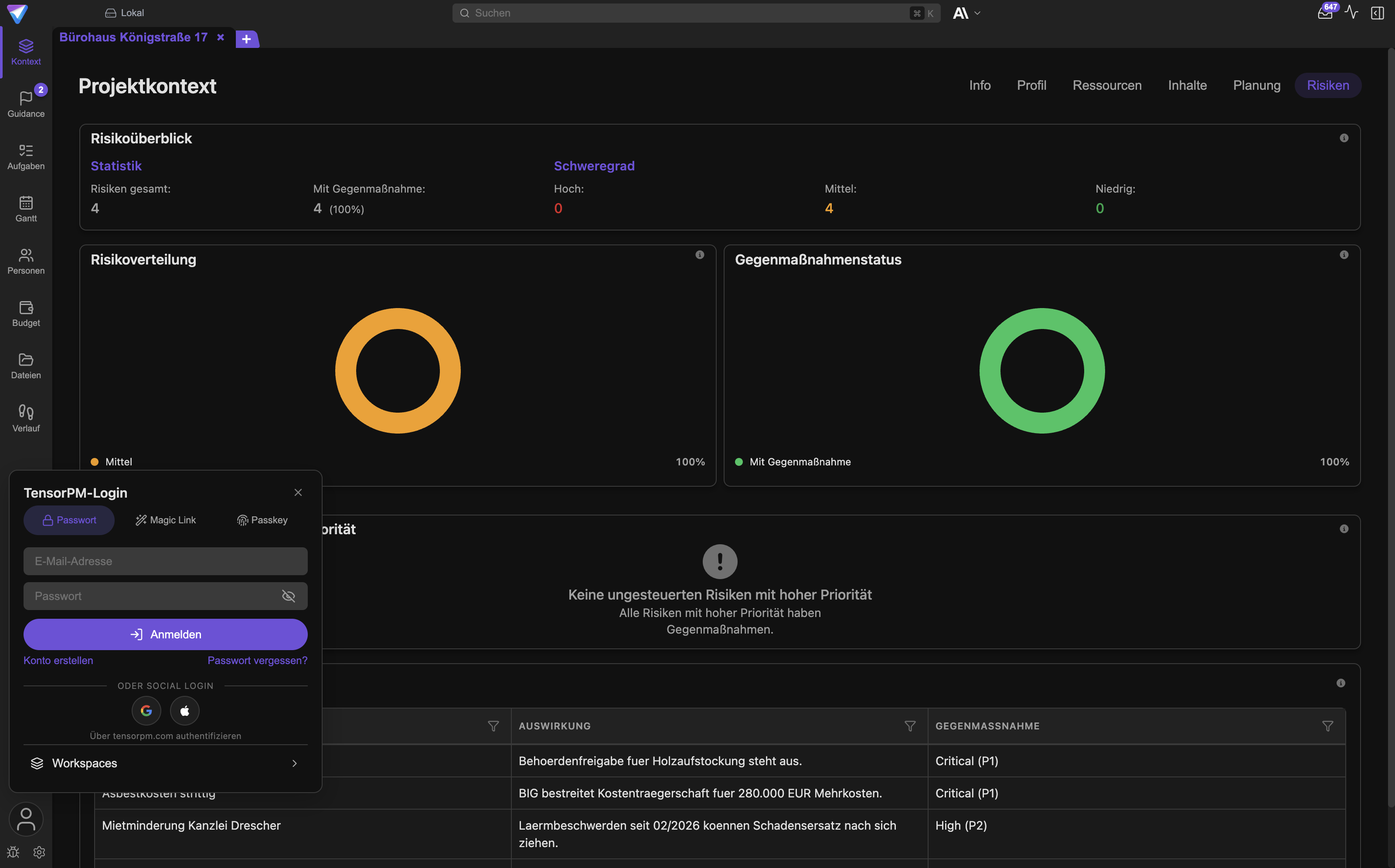
Wichtig: Diese Dinge liegen nicht in den Einstellungen. Die Einstellungen öffnest du über das Zahnrad direkt neben dem Konto-Eintrag. Dort stellst du die KI ein, nicht das Konto.
Konto anlegen
- Klicke unten links auf
Anmelden. - Wechsle im Popover zu
Konto erstellen. - Trage deine E-Mail-Adresse ein und wähle eine Anmeldeart:
PasswortoderMagic Link. Beim Magic Link bekommst du eine E-Mail mit einem Link und brauchst kein Passwort. - Bestätige deine E-Mail-Adresse.
- Du erkennst den Erfolg daran, dass im Popover dein Name steht und darunter der Abo-Status.
Nach dem Anlegen bist du im Tarif Trial und hast sofort Credits für die TensorPM-KI. Eine Kreditkarte brauchst du dafür nicht.
Du kannst TensorPM auch ohne Konto benutzen. Lokale Workspaces und lokale Projekte funktionieren ohne Anmeldung. Cloud Sync selbst gehört zu jedem Tarif, auch zu Trial, setzt aber ein Konto voraus, ebenso wie die TensorPM-KI und Workspace-Einladungen.
Anmelden auf einem weiteren Gerät
- Installiere TensorPM auf dem zweiten Gerät.
- Klicke unten links auf
Anmeldenund wähleTensorPM-Login. - Melde dich mit Passwort, Magic Link oder Passkey an.
- Prüfe im Popover, dass Abo-Status und Credits erscheinen.
Der Kontostand an Credits gehört zum Konto, nicht zum Gerät. Beide Geräte verbrauchen aus demselben Topf. Projektdaten liegen dagegen immer zuerst lokal und gleichen sich in einem Cloud-Workspace in jedem Tarif über die TensorPM-Server ab. Mehr dazu steht unter Sync & Cloud.
Passkeys
Ein Passkey ist eine Anmeldung ohne Passwort. Statt eines Kennworts bestätigst du mit Fingerabdruck, Gesichtserkennung oder der PIN deines Geräts.
- Öffne das Konto-Popover und wähle
Passkeys verwalten. - TensorPM öffnet dafür deinen Systembrowser auf tensorpm.com. Anlegen, Umbenennen und Entfernen passiert dort, nicht in der App.
- Melde dich auf der Website an, falls du dort noch nicht angemeldet bist.
- Lege den Passkey an. Danach kannst du dich in der App über
Mit Passkey anmeldeneinloggen.
Ein Passkey setzt ein bestehendes Konto voraus. Erstelle also zuerst ein Konto per Passwort oder Magic Link und füge den Passkey danach hinzu. Verlierst du das Gerät, kommst du weiterhin über Passwort oder Magic Link hinein.
Abmelden auf einem Gerät
- Öffne das Konto-Popover.
- Wähle ganz unten
Abmelden.
Das trennt nur dieses Gerät von deinem Konto. Dein Abo, deine Credits und deine Cloud-Workspaces bleiben bestehen. Lokale Projekte bleiben auf dem Gerät liegen und öffnen sich weiterhin. Die TensorPM-KI steht nach dem Abmelden nicht mehr zur Verfügung, weil sie am Konto hängt.
Wichtig: Gibst du ein Gerät ab, reicht Abmelden allein nicht. Entferne zusätzlich hinterlegte Anbieterschlüssel und prüfe, ob lokale Projektordner Daten enthalten, die nicht auf dem Gerät bleiben sollen. Siehe Deinstallation & Datenlöschung.
Die drei Tarife
Es gibt genau drei Tarife: Trial, Pro und Business. Die Namen werden nicht übersetzt.
Was die Tarife enthalten
| Trial | Pro | Business | |
|---|---|---|---|
| Preis | kostenlos | 99 Euro im Monat oder 990 Euro im Jahr | individuell, auf Anfrage |
| Zeitlimit | keines | laufendes Abo | individuell |
| KI-Credits | 2.000.000 einmalig | 10.000.000 im Monat | individuell, als gemeinsamer Topf |
| Cloud-Synchronisierung | ja | ja | ja |
| Eigene Cloud-Workspaces | mehrere (Fair Use) | unbegrenzt | unbegrenzt |
| Mitglieder | unbegrenzt, kostenlos | unbegrenzt, kostenlos | unbegrenzt, kostenlos |
| Aktive Projekte | 1 aktives Projekt, archivierte unbegrenzt | 1 aktives Projekt, archivierte unbegrenzt | individuell |
| Eigene Anbieterschlüssel | nein | nein | ja, als einziger Tarif |
Die 2.000.000 Credits im Trial sind eine einmalige Zuteilung und verfallen nicht. Trial läuft nicht ab. Du verbrauchst die Credits in deinem Tempo.
Die 10.000.000 Credits bei Pro sind ein Monatsbudget. Sie füllen sich zum Ende jeder Abrechnungs- periode wieder auf. Nicht verbrauchte Credits werden nicht angespart.
Bei Business teilt sich die Organisation einen gemeinsamen Topf. Im Konto-Popover und im KI-Tab der
Einstellungen erscheint dann der Hinweis Team-Pool. Alle Mitglieder zahlen auf denselben Zähler
ein.
Wichtig: Es gibt keine Credit-Aufladungen und keine automatische Aufladung mehr. Wer mehr braucht, wechselt den Tarif oder nutzt einen der anderen KI-Wege weiter unten.
Für wen welcher Tarif passt
- Trial passt, wenn du TensorPM in Ruhe an einem echten Projekt ausprobieren willst. Cloud Sync und kostenlose Mitarbeitende sind bereits enthalten. Auch als Dauerlösung möglich, solange dir 2.000.000 Credits und eine Handvoll eigener Cloud-Workspaces reichen.
- Pro passt, wenn du täglich mit dem Projektagenten arbeitest und ein größeres monatliches Credit-Budget brauchst oder unbegrenzt viele eigene Cloud-Workspaces. Monatlich, wenn du flexibel bleiben willst, jährlich, wenn das Projekt länger läuft.
- Business passt, wenn eine Organisation dahintersteht: mehrere Projekte gleichzeitig, ein gemeinsames KI-Budget, eigene Verträge mit KI-Anbietern oder Vorgaben, dass KI-Anfragen über die eigenen Anbieterkonten laufen müssen.
Mitglieder sind in jedem Tarif kostenlos und unbegrenzt, und in einem fremden Workspace mitzuarbeiten kostet nichts. KI-Anfragen innerhalb eines Workspace werden dem Credit-Budget des Workspace-Besitzers berechnet. Mehr dazu unter Workspaces & Teams.
Aktuelle Preise und kaufmännische Details stehen auf https://tensorpm.com/de/pricing. Verbindlich ist immer, was die App unter deinem Konto anzeigt.
Credits verstehen
Was ein Credit ist
Ein Credit ist die Recheneinheit für die KI-Nutzung über TensorPM. Du kannst ihn dir wie eine Verbrauchseinheit auf einem Zähler vorstellen: Jede KI-Anfrage dreht den Zähler ein Stück weiter. Wie weit, hängt davon ab, wie viel Text die KI lesen musste und wie viel sie geschrieben hat.
Zwei Dinge sind wichtig:
- Credits kosten nur Anfragen, die über TensorPM laufen. Nutzt du ein eigenes Claude- oder ChatGPT-Abo, einen eigenen Server oder eigene Anbieterschlüssel, wird kein einziger Credit verbraucht. Dann rechnet der jeweilige Anbieter direkt mit dir ab.
- Lesen ist günstig, Schreiben ist teuer. Eine lange Analyse mit kurzer Antwort kostet weniger als eine kurze Frage, auf die ein mehrseitiges Dokument folgt.
Die genaue Formel
Für alle, die es genau wissen wollen: Die KI zerlegt Text in kleine Bausteine, sogenannte Token. Ein Token ist grob ein Wortteil, etwa vier Zeichen. Die Abrechnung zählt drei Sorten getrennt:
Credits = Eingabe-Token x 1
        + zwischengespeicherte Eingabe x 0,2
        + Ausgabe-Token x 4
- Eingabe-Token sind alles, was die KI liest: deine Frage plus der Projektkontext, den TensorPM mitschickt.
- Zwischengespeicherte Eingabe ist der Teil, den der Anbieter aus einer vorherigen Anfrage noch vorhält. Er kostet nur ein Fünftel. Genau deshalb ist ein fortgesetzter Chat günstiger als fünfmal derselbe Kontext in fünf frischen Chats.
- Ausgabe-Token sind das, was die KI schreibt. Sie kosten das Vierfache, weil das Modell sie Stück für Stück erzeugt.
Dieselbe Formel siehst du in der App: Im KI-Tab der Einstellungen steht neben KI-Credits ein
Info-Symbol mit der Erklärung.
Ein Rechenbeispiel
Eine typische Frage im laufenden Chat, etwa „Was blockiert gerade den kritischen Pfad?“:
| Anteil | Token | Faktor | Credits |
|---|---|---|---|
| neue Eingabe (Frage plus neue Kontextteile) | 4.000 | 1 | 4.000 |
| zwischengespeicherte Eingabe (Kontext aus dem laufenden Chat) | 8.000 | 0,2 | 1.600 |
| Ausgabe (die Antwort) | 900 | 4 | 3.600 |
| Summe | 9.200 |
Zur Einordnung: Mit den 2.000.000 Credits im Trial sind das rund 200 solcher Anfragen. Mit den 10.000.000 Credits im Pro-Monatsbudget rund 1.000 pro Monat. Kurze Rückfragen kosten deutlich weniger, ein erzeugtes Dokument oder eine große Projektanalyse deutlich mehr.
Wo du deinen Verbrauch siehst
Es gibt drei Orte, und sie zeigen unterschiedlich genaue Bilder:
- Konto-Popover unten links. Die Statuszeile zeigt bei Trial
{{Anzahl}} Credits übrigoderAufgebraucht. Bei einem bezahlten Abo steht dort der Abo-Status und das Datum der nächsten Abrechnung. Der kleine Aktualisieren-Knopf daneben holt den Stand neu vom Server. Einstellungen->KI. IstTensorPMals bevorzugter KI-Provider eingestellt und bist du angemeldet, erscheint dort der BlockKI-Creditsmit verbrauchtem Anteil, Gesamtbudget und dem Datum, an dem sich das Budget zurücksetzt. Bei Business steht danebenTeam-Pool.KI-Aktivitätsverlauf. Den öffnest du über das Aktivitätssymbol in der Kopfleiste. Er listet jede KI-Aktion des Projekts mit Status und Dauer. Über die Token-Verbrauchsstatistik siehst du den Verbrauch nach Kategorie: Chat, Projekterstellung, Aufgaben und Projektstruktur, Guidance und Projektanalysen, Dokumente und Dateien, automatische Projektunterstützung, KI-Agenten. Das ist der einzige Ort, an dem du erkennst, welcher Bereich dein Budget frisst.
Wie du den Verbrauch senkst
- Schau zuerst in den
KI-Aktivitätsverlauf. Meist stecken über die Hälfte der Kosten in einer einzigen Kategorie. - Schalte automatische Funktionen ab, die du nicht brauchst. Unter
Einstellungen->Allgemein->KIliegenAutomatische KI-PriorisierungundTäglicher Projektstatus-Check. Beide laufen im Hintergrund und kosten Credits. - Prüfe die proaktiven Projekt-Check-ins. Jeder geplante Check-in stellt eine KI-Anfrage pro aktivem Projekt. Eine seltenere Häufigkeit senkt den Verbrauch sofort.
- Bleib im laufenden Chat, statt für jede Rückfrage einen neuen zu starten. Der zwischengespeicherte Kontext kostet nur ein Fünftel.
- Häng nur die Dokumente an, die für die Frage zählen. Jede angehängte Seite ist Eingabe.
- Frag gezielt. „Fasse die drei größten Risiken in je zwei Sätzen zusammen“ kostet einen Bruchteil von „Analysiere das Projekt“.
- Wähl ein kleineres Modell für einfache Aufgaben. Die Modellauswahl liegt in der Kopfleiste und
unter
Einstellungen->KI->Bevorzugtes Modell. - Verlagere Dauerlast auf einen der anderen KI-Wege. Ein eigenes Claude- oder ChatGPT-Abo verbraucht gar keine Credits.
Die vier Wege, KI zu nutzen
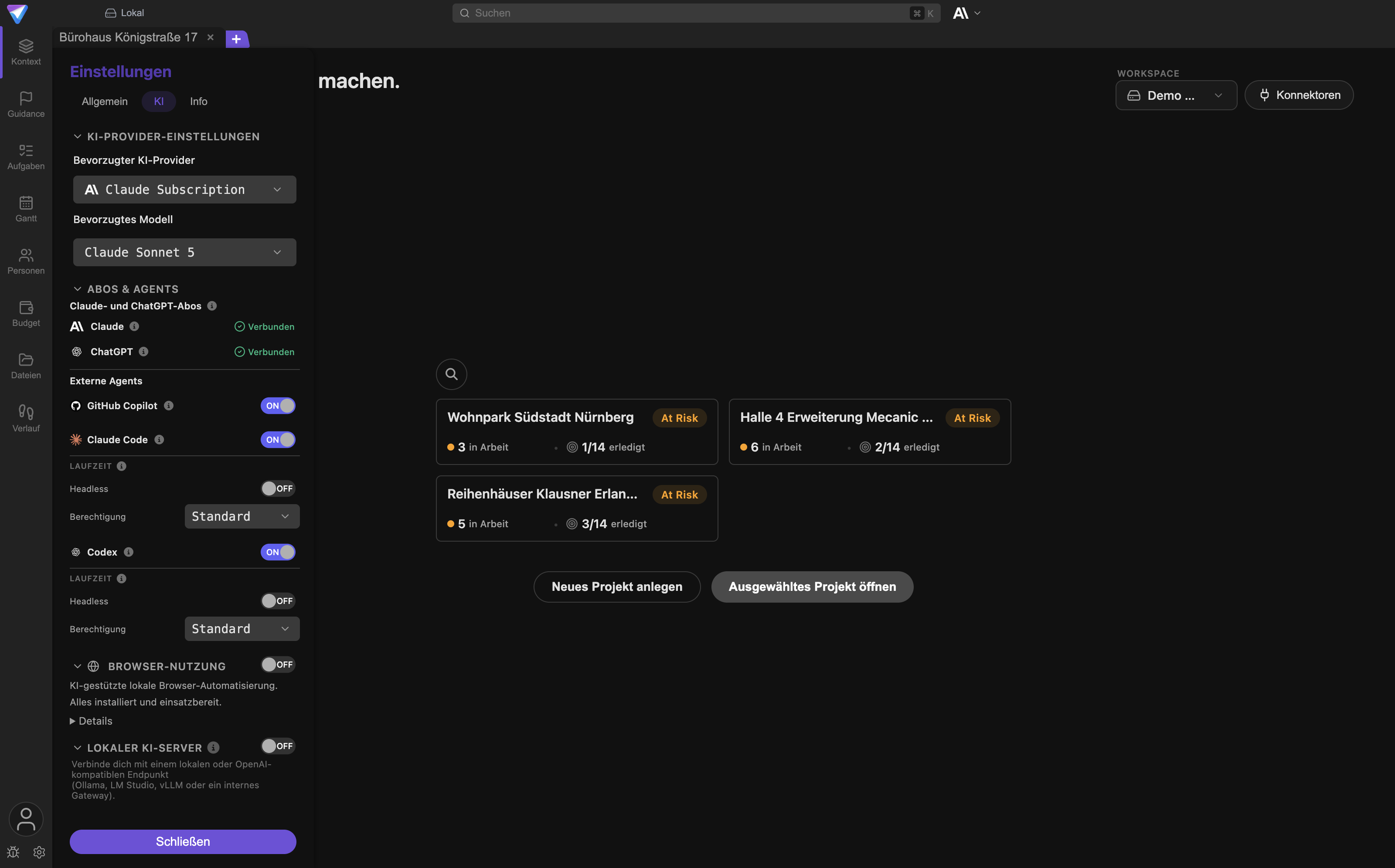
TensorPM kann auf vier Arten an KI kommen. Alle vier stellst du unter Einstellungen -> KI ein.
Aktiv ist immer der Weg, der unter Bevorzugter KI-Provider gewählt ist.
Weg 1: TensorPM-KI über das Konto
Voraussetzung: ein TensorPM-Konto, angemeldet. Sonst nichts.
Kosten: verbraucht Credits nach der Formel oben. Keine separate Rechnung, keine Anbieterkonten.
Datenschutzfolge: Die Anfrage geht über die TensorPM-Server an den dahinterliegenden Modellanbieter. Projektinhalte, die du mitschickst, verlassen dein Gerät. Das ist der Preis für den einfachsten Weg. Lies vor der Nutzung mit sensiblen Projekten die Datenschutzangaben auf https://tensorpm.com/de/privacy.
Einrichtung:
- Melde dich unten links an.
- Öffne
Einstellungen->KI. - Wähle unter
Bevorzugter KI-Providerden EintragTensorPM. - Wähle unter
Bevorzugtes Modellein Modell. - Du erkennst den Erfolg daran, dass darunter der Block
KI-Creditserscheint und der Chat antwortet.
Weg 2: Ein Claude- oder ChatGPT-Abo über die lokale Anwendung
Voraussetzung: ein passendes Claude-Abo (Pro oder Max) beziehungsweise ein berechtigtes
ChatGPT-Abo. Zusätzlich muss die offizielle lokale Anwendung des Anbieters auf dem Rechner
installiert sein: Claude Code für Claude, Codex für ChatGPT. Fehlt sie, zeigt TensorPM den Status
Nicht installiert.
Kosten: kein Credit-Verbrauch bei TensorPM. Du bezahlst nur dein bestehendes Abo beim Anbieter.
Datenschutzfolge: Die Zugangsdaten bleiben in der lokalen Anwendung des Anbieters, TensorPM sieht sie nie. Die Projektinhalte gehen aber weiterhin an den Anbieter, weil dort das Modell läuft. Es gelten dessen Vertragsbedingungen, nicht die von TensorPM.
Einrichtung:
- Installiere die offizielle lokale Anwendung, falls sie fehlt.
- Öffne
Einstellungen->KI->Abos & Agents. - Klicke im Abschnitt
Claude- und ChatGPT-Abosbeim gewünschten Anbieter aufAnmelden. - Schließe die Anmeldung im Browserfenster ab, das sich öffnet. Es ist die offizielle Anmeldeseite des Anbieters.
- Kehre zu TensorPM zurück. Der Status wechselt auf
Verbunden. - Wähle den Anbieter unter
Bevorzugter KI-Provideraus.
Verliert die Verbindung ihre Gültigkeit, steht dort Neu anmelden. Welche Modelle verfügbar sind,
bestimmt dein Abo, und das kann sich ändern.
Weg 3: Lokale KI über einen kompatiblen Server
Voraussetzung: ein laufender Modellserver, den du erreichst. Unterstützt wird alles, was die gängige OpenAI-kompatible Schnittstelle spricht: Ollama, LM Studio, vLLM oder ein internes Gateway deiner IT. TensorPM empfiehlt Modelle mit mindestens 128.000 Token Kontextfenster und guter Werkzeugnutzung, sonst kann der Projektagent seine Werkzeuge nicht sinnvoll aufrufen.
Kosten: kein Credit-Verbrauch. Du zahlst mit deiner eigenen Hardware oder deinem Serverbudget.
Datenschutzfolge: Das ist der Weg mit dem kleinsten Datenabfluss, wenn der Server wirklich bei dir steht. Aber Vorsicht: „lokal“ heißt nicht automatisch „privat“. Ein Gateway, das Anfragen an einen Cloud-Anbieter weiterreicht, sieht in TensorPM genauso aus wie ein Rechner unter dem Schreibtisch. Kläre das vorher.
Einrichtung:
- Öffne
Einstellungen->KIund öffne den BereichLokaler KI-Server. - Klicke
Server automatisch erkennenoder trage dieEndpunkt-URLselbst ein. - Hinterlege einen
API-Key (optional), falls dein Endpunkt geschützt ist. Er wird über den Schlüsselspeicher des Betriebssystems abgelegt. - Klicke
Verbindung testen. Bei Erfolg meldet TensorPM die Zahl der gefundenen Modelle. - Wähle ein erkanntes Modell aus oder trage den
Modellnamevon Hand ein. - Stell den bevorzugten Provider auf den lokalen Server um und stell zuerst eine harmlose Frage, bevor du Schreibaktionen zulässt.
Weg 4: Eigene Anbieterschlüssel im Business-Tarif
Voraussetzung: ein Business-Konto. Eigene Anbieterschlüssel sind der einzige Punkt, der ausschließlich diesem Tarif vorbehalten ist. Unterstützt werden OpenAI, Anthropic, Google und Mistral.
Kosten: kein Credit-Verbrauch bei TensorPM. Der Anbieter rechnet direkt mit dem Konto ab, dem der Schlüssel gehört. Das Kostenrisiko liegt damit bei eurer Organisation.
Datenschutzfolge: Die Anfrage geht direkt vom Gerät an den Anbieter, ohne Umweg über TensorPM. Es gilt der Vertrag zwischen eurer Organisation und dem Anbieter, inklusive dessen Regeln zu Protokollierung und Datenspeicherung.
Einrichtung:
- Öffne
Einstellungen->KI->KI-Keys. - Trage den Schlüssel im Feld des jeweiligen Anbieters ein. Die Schlüssel bleiben lokal auf dem Gerät, werden dort verschlüsselt gespeichert und nie an TensorPM-Server übertragen.
- Wähle den Anbieter unter
Bevorzugter KI-Providerund ein Modell darunter. - Optional: Setze unter
Rate Limitsdie WerteRequests/minundTokens/min, damit TensorPM euer Anbieterkontingent nicht überfährt.Erkennenliest die Werte aus den Antworten des Anbieters aus.
Wichtig: Füge einen Schlüssel niemals in den Chat ein. Er gehört ausschließlich in das Feld in den Einstellungen. Alles, was im Chat steht, geht an das Modell.
Unabhängig vom Tarif liegt im KI-Tab außerdem die Gruppe Websuche. Dort hinterlegst du einen
Brave-Search-API-Key, wenn der Projektagent im Web suchen können soll. Sobald ein gültiger Schlüssel
hinterlegt ist, wird die Suche automatisch genutzt.
Vergleich der vier Wege
| Weg | Voraussetzung | Credits | Daten gehen an |
|---|---|---|---|
| TensorPM-KI | Konto, angemeldet | ja | TensorPM und dessen Modellanbieter |
| Claude- oder ChatGPT-Abo | Abo plus lokale Anwendung | nein | den Abo-Anbieter |
| Lokale KI | eigener kompatibler Server | nein | deinen Server, sonst niemanden |
| Eigene Anbieterschlüssel | Business-Tarif | nein | den Anbieter direkt |
Du kannst jederzeit wechseln. Der aktive Weg gilt für alle Projekte auf diesem Gerät.
Pro-Gutschein einlösen
Ein Pro-Gutschein schaltet Pro für eine feste Laufzeit frei, ohne Stripe und ohne Kreditkarte. Der Punkt erscheint nur bei Trial-Konten.
- Öffne unten links das Konto-Popover.
- Wähle
Gutschein einlösen. - Trage den Code im Feld
Pro-Gutscheincodeein. - Klicke
Einlösen. - Bei Erfolg meldet die App, bis wann Pro aktiv ist. Der Abo-Status im Popover wechselt.
Mögliche Meldungen und was sie bedeuten:
| Meldung | Bedeutung |
|---|---|
| Diesen Gutscheincode gibt es nicht. | Tippfehler oder falscher Code. Prüfe die Eingabe. |
| Dieser Gutschein wurde schon zu oft eingelöst. | Das Einlöselimit des Codes ist erreicht. |
| Dieser Gutschein wurde deaktiviert. | Der Code wurde zurückgezogen. Frag bei der Stelle nach, die ihn ausgegeben hat. |
| Dieser Gutschein ist abgelaufen. | Der Code hat seine Gültigkeit überschritten. |
| Mit einem aktiven Abo kannst du keinen Gutschein einlösen. | Du hast bereits ein laufendes Stripe-Abo. |
| Du hast diesen Gutschein bereits eingelöst. | Kein Fehler, die Laufzeit wurde schon einmal gutgeschrieben. |
Läuft dein Pro bereits über einen Gutschein, kannst du es mit einem weiteren Gutschein verlängern.
Wenn die Credits aufgebraucht sind
Im Konto-Popover steht dann Aufgebraucht, und der Chat meldet: Deine KI-Credits sind aufgebraucht.
Was weiterhin funktioniert:
- Alle Projektdaten bleiben vollständig erhalten und offen.
- Du kannst weiterarbeiten: Aufgaben, Termine, Budget, Dateien, Verlauf, alles ohne KI.
- Cloud-Synchronisierung läuft weiter, solange dein Abo aktiv ist.
Was nicht mehr funktioniert: alles, was eine KI-Anfrage über TensorPM auslöst. Also Chat, Analysen, Guidance, Distillation, automatische Priorisierung und Projekt-Check-ins.
Deine Möglichkeiten:
- Trial: Auf Pro upgraden über
Auf Pro upgradenim Konto-Popover, oder einen Pro-Gutschein einlösen, oder auf einen der anderen drei KI-Wege wechseln. - Pro: Warte auf das Zurücksetzen des Monatsbudgets. Das Datum steht unter
Einstellungen->KIbeim BlockKI-Credits. Für die Zwischenzeit hilft ein Claude- oder ChatGPT-Abo oder ein lokaler Server. - Business: Der Topf ist geteilt, also ist er möglicherweise woanders in der Organisation verbraucht worden. Sprich mit der Person, die den Vertrag verwaltet. Business kann zusätzlich auf eigene Anbieterschlüssel ausweichen.
Eine Aufladung einzelner Credits gibt es nicht mehr, und es gibt auch keine automatische Aufladung.
Warum sich die Modellliste ändert
TensorPM zeigt nur Modelle, die für dein Konto, deinen gewählten Weg und dieses Gerät tatsächlich nutzbar sind. Deshalb ändert sich die Liste:
- Bei einem Abo werden die Modelle aus der verbundenen lokalen Anwendung gelesen.
- Bei lokaler KI kommen sie von deinem Server.
- Bei TensorPM-KI und eigenen Schlüsseln ändert sich der Katalog mit neuen Programmversionen.
Die Auswahl in der App ist deshalb immer die aktuelle Wahrheit. Steht dort nur KI ohne Modell, ist
noch kein nutzbarer Weg verbunden.
Sicherheitscheckliste
- Nur offizielle Anmeldefenster und offizielle Anwendungen der Anbieter verwenden.
- Passwörter und Anbieterschlüssel niemals in den Chat schreiben.
- Nur Anbieter verbinden, die für die Daten dieses Projekts freigegeben sind.
- Bei lokalen Servern prüfen, ob der Server selbst Daten weiterreicht.
- Eine neue Einrichtung zuerst an einem risikoarmen lokalen Projekt testen.
- Vorgeschlagene Schreibaktionen und erzeugte Dateien vor der Freigabe lesen.
- Beim Gerätewechsel abmelden und hinterlegte Schlüssel entfernen.
Häufige Fragen
Brauche ich ein Konto, um TensorPM zu benutzen? Nein. Lokale Workspaces und lokale Projekte laufen ohne Anmeldung. Cloud Sync ist in jedem Tarif enthalten, auch in Trial, setzt aber ein Konto voraus, ebenso wie die TensorPM-KI.
Läuft der Trial nach 14 oder 30 Tagen ab? Nein. Trial hat kein Zeitlimit. Es endet erst, wenn die 2.000.000 Credits verbraucht sind, und auch dann bleiben alle Projektdaten nutzbar.
Verbraucht ein Claude-Abo trotzdem Credits? Nein. Nur Anfragen über TensorPM kosten Credits. Abo, lokaler Server und eigene Schlüssel laufen komplett am Credit-Zähler vorbei.
Kann ich mit Pro mehrere Projekte parallel führen? Pro erlaubt ein aktives Projekt. Archivierte Projekte bleiben unbegrenzt erhalten und lassen sich wieder aktivieren. Wer dauerhaft mehrere parallel braucht, braucht Business.
Was passiert mit meinen Daten, wenn ich mein Abo kündige? Die Projekte liegen lokal und bleiben es. Was mit Cloud-Workspaces geschieht, steht unter Workspaces & Teams.
Kann ich Credits nachkaufen? Nein. Credit-Aufladungen und automatische Aufladung wurden entfernt. Es bleiben Tarifwechsel oder ein anderer KI-Weg.
Zählt ein Fehlversuch der KI auch Credits? Ja, sobald das Modell die Anfrage gelesen und begonnen hat zu antworten. Ein Abbruch nach wenigen Sekunden ist deshalb billiger als eine vollständige Antwort, aber nicht kostenlos.
Wo sehe ich, welcher Bereich mein Budget verbraucht?
Im KI-Aktivitätsverlauf über die Token-Verbrauchsstatistik nach Kategorie und Modell.
Kann ich verschiedene Wege für verschiedene Projekte einstellen? Nein. Der bevorzugte KI-Provider gilt geräteweit für alle Projekte. Du kannst aber jederzeit umschalten.
Wenn etwas nicht klappt
Der Chat antwortet nicht und meldet, dass die KI nicht verfügbar ist. TensorPM zeigt in der Meldung selbst den passenden nächsten Schritt an. Meistens ist es einer von vier Fällen: nicht angemeldet, Credits aufgebraucht, Business-Schlüssel fehlt oder die lokale KI ist halb eingerichtet. Der Knopf in der Meldung führt direkt an die richtige Stelle.
Der Abo-Status im Popover ist veraltet. Klicke den Aktualisieren-Knopf rechts in der Statuszeile. Er holt Abo und Credits neu vom Server. Ohne Internetverbindung bleibt der zuletzt bekannte Stand stehen.
Anmelden beim Claude- oder ChatGPT-Abo führt zu nichts.
Prüfe zuerst, ob dort Nicht installiert steht. Ohne die offizielle lokale Anwendung des Anbieters
kann TensorPM die Anmeldung nicht starten. Meldet die App, dass die Anmeldung zu lange gedauert hat
oder kein Abo erkannt wurde, starte sie neu und schließe das Browserfenster diesmal vollständig ab.
Die Verbindung zum lokalen Server schlägt fehl. Prüfe die Endpunkt-URL, ob der Server läuft und ob eine Firewall dazwischensteht. Findet TensorPM den Server, aber keine Modelle, trage den Modellnamen von Hand ein.
Der Gutscheincode wird abgelehnt. Sieh in der Tabelle im Abschnitt zum Gutschein nach, was die Meldung bedeutet. Der häufigste Fall ist ein aktives Stripe-Abo, das eine Einlösung blockiert.
Ein Anbieterschlüssel wird nicht angenommen. Eigene Schlüssel funktionieren nur im Business-Tarif. Prüfe außerdem, ob der Schlüssel zum richtigen Anbieter gehört und ob dein Betriebssystem sicheren Speicher bereitstellt. Unter Linux muss der GNOME-Keyring oder KDE Wallet installiert und entsperrt sein.
Die Modellauswahl zeigt nur KI.
Es ist noch kein nutzbares Modell verbunden. Geh die Einrichtung des gewählten Wegs noch einmal
durch.
Weitere Symptome und Lösungen stehen unter Fehlerbehebung.
Nächste Schritte
- Mit dem Projektagenten arbeiten: Projektagent, Chat & Schnellaktionen
- Cloud-Zugriff und Einladungen verstehen: Workspaces & Teams
- Synchronisierung einrichten: Sync & Cloud
- Verschlüsselungsgrenzen prüfen: Verschlüsselung & Sicherheit
- Einstellungen und Backups kennenlernen: Einstellungen & Backups
- Verbindungsproblem lösen: Fehlerbehebung