
Troubleshooting
In short
This article is organised by what you see on screen, not by which part of the software is involved. Every entry lists the real messages TensorPM shows, the likely cause, and the steps that help. If a message is on your screen right now, search this page for its wording. The last two sections cover how to export a support bundle and where the log files live.
How to work through a problem
Four rules will get you to the cause faster:
- Change one thing at a time and check whether the problem is gone. If you change three settings at once, you will not know which one helped.
- Read the whole message. Many TensorPM errors have a
Show technical detailstoggle. Underneath you getType,Severity,Timestampand aCorrelation ID. The correlation ID is how support finds this exact operation again. - Write down the exact clicks that lead to the error. A problem you can repeat is almost always solved quickly.
- Do not delete anything as a first step. Not the data folder, not projects, not the database. Create a backup first through
Settings->General->Database Backup->Create Backup.
TensorPM does not start or crashes
A banner about the last session appears at startup
Symptom: A banner at the top says TensorPM closed unexpectedly last time, TensorPM had trouble starting last time, A background process crashed in your last session or TensorPM ran into an issue last session.
Likely cause: TensorPM recorded a crash when it last closed. The banner is not a new fault, it is a report about something that already happened.
Fix:
- Click
Show detailsin the banner. It listsSource,When,App versionand, depending on the case,ReasonorExit code. - Click
Send report. TensorPM turns it into a bug report and attaches the diagnostic logs as a support bundle. - Carry on working. If no further crash follows, click
DismissorDismiss all.
If that does not help: If the banner returns after every start, note the line next to Source. A window crash and a main process error are different causes and need different analysis at support.
The app does not start at all
Symptom: Nothing happens after the double click, or the window stays blank.
Likely cause: An old application process is still running, or an update has not finished unpacking.
Fix:
- Wait a minute after an update. The first start after an update takes longer than usual.
- Start TensorPM again from the normal application shortcut, not from a copy in your downloads folder.
- Restart the computer if the previous application process did not close.
- Then open
Settings->Infoand check underVersionthat the expected version is running.
If that does not help: Open the log folder (see below) and look at error.log in the newest session. Attach that file to your support request.
Something went wrong appears while you work
Symptom: Part of the interface is replaced by Something went wrong or An unexpected error occurred. Please try refreshing the page. In the action list the variant reads Something went wrong with the Action List, and for a single row Table Error.
Likely cause: One record or one view cannot be rendered. Your data is almost never affected.
Fix:
- Click
Try Again. That is often enough. - If it persists, click
Reload Page. - Click
Send reportso the error reaches the team with its stack information. - Remember which entry or row was open. That record is usually the cause.
I see no AI, or the AI does not answer
AI Setup Required
Symptom: A dialog titled AI Setup Required appears. Depending on the situation the text is To use AI, sign in or create a free TensorPM account., To use hosted AI features, use TensorPM Pro or configure Local AI. or Add your API key to use AI with your Business account. In the chat the same situation reads To use AI, sign in to TensorPM, add Business API keys, or set up Local AI.
Likely cause: No route to an AI is configured. TensorPM knows four: sign-in with a TensorPM account, a Claude or ChatGPT subscription, a local AI server, and your own API keys on Business.
Fix:
- In the dialog click
Sign In,Add API KeyorOpen Settings, whichever is offered. - Otherwise open
Settings->AI. If the blockAI features not available:is shown, it lists every open route:Or sign in with Claude or ChatGPT under Subscriptions & Agents below,Or connect to a local AI server (Ollama, LM Studio, vLLM)and, on Business,Or, on Business, add OpenAI, Anthropic, Google, or Mistral AI keys below. - Set up exactly one of those routes completely.
- Then pick a model in the top bar.
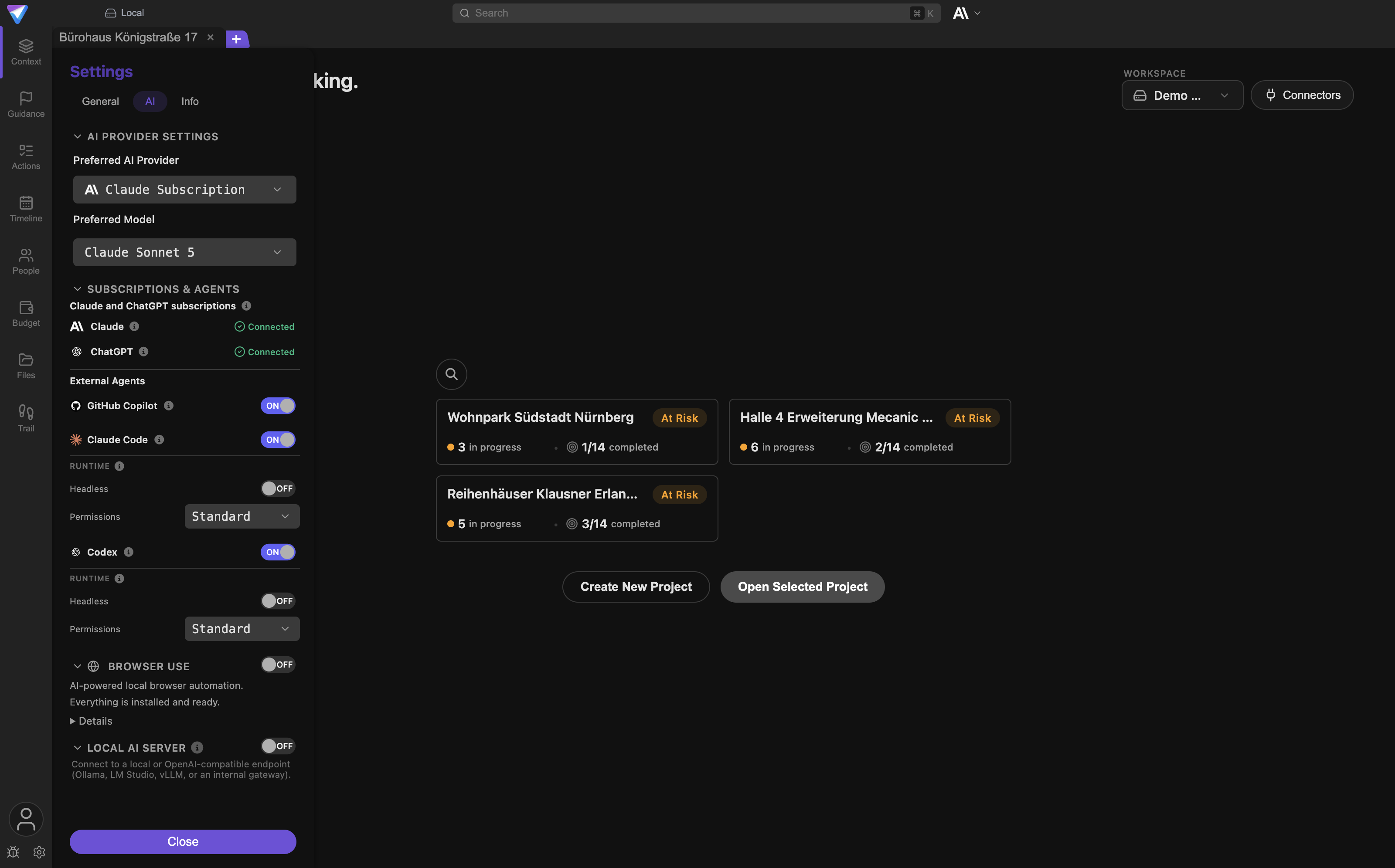
If that does not help: Right after signing in you may see The account login completed, but AI access could not be refreshed. Close and reopen the settings so TensorPM re-checks your access.
Key Required in the model selector
Symptom: A model in the selector is marked Key Required, or Settings -> AI shows Please set a valid AI key for this provider to select models.
Likely cause: The provider is selected but there is no valid access key for it. Your own keys are a Business feature.
Fix:
- Open
Settings->AI->AI Keys. - Enter the provider key and save.
- If the status then shows
Invalid, the provider rejected the key. Check it in your provider account. - If it shows
Rate limited, the key is valid but the provider is throttling right now. Wait and try again.
If that does not help: The API key could not be stored securely. means TensorPM cannot use your operating system's secure storage. That is the same problem as the Keyring sync status below.
AI response failed
Symptom: A red card in the chat headed Error message shows AI response failed. If messages are queued you also get Queue paused because the response failed.
Likely cause: The provider aborted the request, the connection dropped, or a limit was hit.
Fix:
- Click
Copy full error messageand read the technical part. It nearly always names the provider and the reason. - Click
Retry message. - Then click
Resumeif the queue is paused. - If it keeps failing, switch to another model in the top bar as a test.
If that does not help: If the technical part points to a tool rather than the model, a connector may be the cause. Check the connector section as well.
Rate Limit Reached
Symptom: Messages such as Rate Limit Reached, Rate limit reached, try again shortly, {{provider}} API limit reached., Rate limit exceeded. Please try again later. or You have reached a rate limit. It will reset on {{date}}. TensorPM often shows Waiting {{count}} seconds... and a line Requests: {{current}}/{{max}} per minute.
Likely cause: The AI provider allows only a certain number of requests per minute. That is a provider limit, not a defect.
Fix:
- Wait out the period shown. In many cases TensorPM retries on its own.
- Do not start a second large analysis while the first is still running.
- On Business with your own keys, open
Settings->AI->Rate Limitsand setRequests/minandTokens/minto match your provider tier.Detectreads the values from the provider's responses. - If it stays tight permanently, consider the route the app itself suggests:
Consider upgrading to Pro for higher limits.
Signing in to Claude or ChatGPT does not work
Symptom: Sign-in was cancelled or failed. Please try again. or Sign-in timed out. Please start it again. In Subscriptions & Agents the status then reads Not installed instead of Connected.
Likely cause: The matching local application is not installed, not signed in, or was closed during the sign-in.
Fix:
- Open
Settings->AI->Subscriptions & Agents. - Check the status under
Claude and ChatGPT subscriptions. If it readsNot installed, install the official local application first. - Click
Sign inand finish the flow promptly, otherwise it times out. - If the status used to be
Connectedand is not any more, clickReconnect.
If that does not help: Messages such as Failed to check Claude Code status or Failed to check Codex status mean TensorPM could not run the local application. Restart TensorPM after installing it.
Credits, sign-in and subscription
Credit Limit Reached
Symptom: A dialog titled Credit Limit Reached appears, or the chat shows the short form Credit limit reached. In the account popover the state reads Exhausted.
Likely cause: Your AI credits are used up. Credits are only consumed when AI runs through TensorPM. Your own keys and Claude or ChatGPT subscriptions never consume credits.
Fix:
- Open the account popover at the bottom left and read
{{amount}} credits left. - With an active subscription the dialog says
Your monthly credits will reset on <date>.Note that date. - On Trial the dialog offers
Upgrade to Pro for 10M monthly credits. - If you need more sooner, the app's own advice applies:
Need more credits now? Contact support to review your plan.
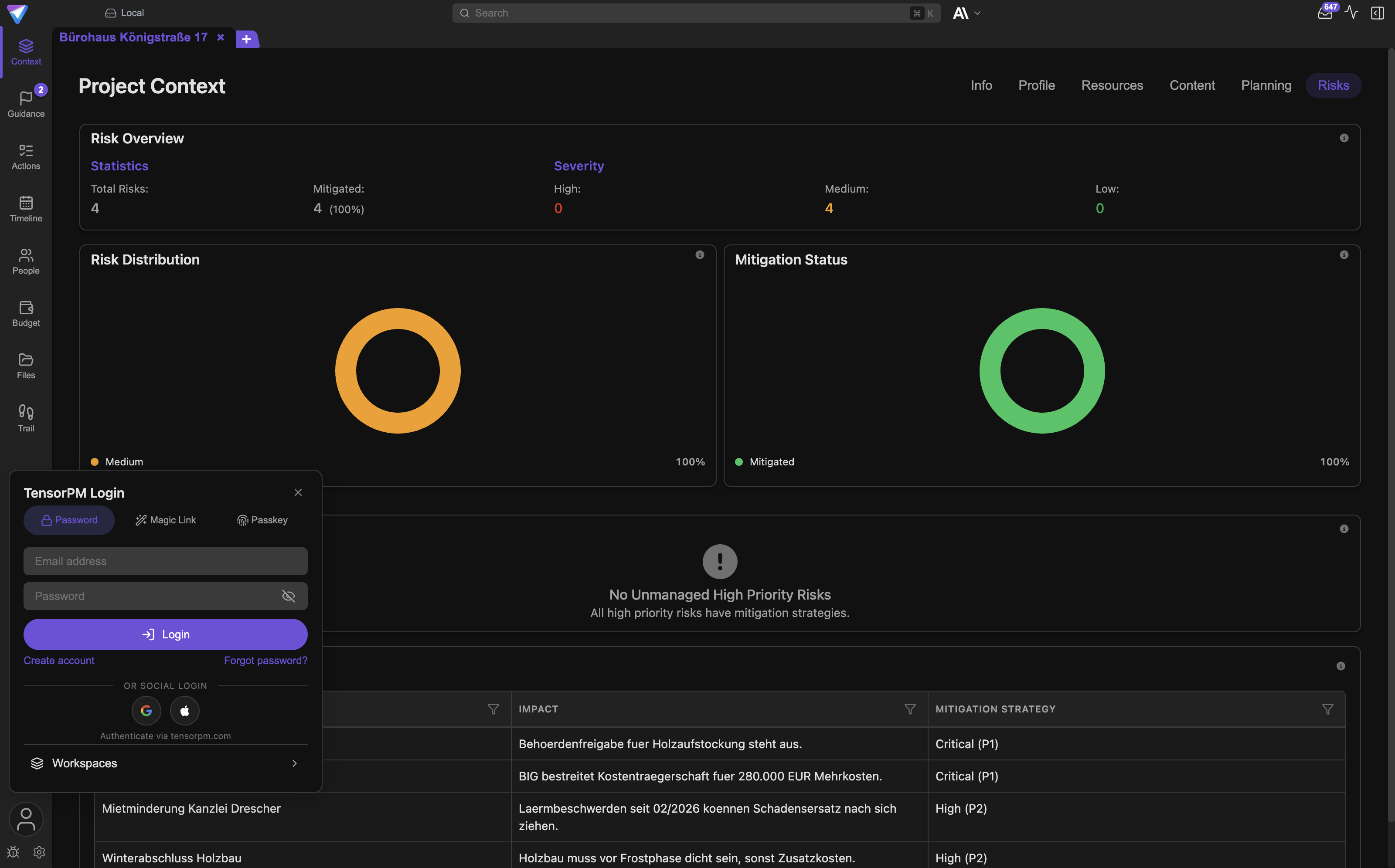
Signing in to the TensorPM account fails
Symptom: Login failed, Registration failed, Email verification failed, Magic link verification failed or Please enter a valid email address.
Likely cause: Wrong credentials, an expired link, or a brief connection problem.
Fix:
- Check the spelling of the email address.
- Request a new link if the old one expired. If sending fails, TensorPM reports
Failed to send magic linkorFailed to resend verification email. - If you see
The browser could not be opened. Please try again or use a password or magic link., sign in with your password. Passkeys and account management deliberately run in the browser. - If you see
Failed to open browser. Please visit tensorpm.com/account manually., open that address yourself.
If that does not help: With enterprise sign-in you may get Enterprise sign-in failed. Please try again. or a note that an account with this email already exists. Sign in with password or passkey in that case and contact support.
The voucher is not accepted
Symptom: Redeem voucher returns one of these: This voucher code doesn't exist. Please check your input., This voucher has reached its redemption limit., This voucher has expired., This voucher has been disabled., You can't redeem a voucher while a subscription is active. or The voucher couldn't be redeemed. Please try again later.
Likely cause: Each message says exactly what is wrong. The last one is temporary, all the others are final.
Fix:
- Check the code character by character. Do not confuse zero and the letter O.
- You cannot redeem a voucher while a paid subscription runs. Pro that was already activated by a voucher can be extended with another voucher.
- For
Please try again later, wait a few minutes and retry. - For every other message, go back to whoever issued the code.
Project limit reached
Symptom: A message such as Project limit reached ({{used}} of {{limit}} active projects). Archive a project or upgrade your plan. In some cases it adds that the project was moved to a local workspace.
Likely cause: Your plan allows a limited number of active projects in cloud workspaces. Archived projects do not count.
Fix:
- Look at the badge
{{used}} of {{limit}} active projects. It counts only active projects across your cloud workspaces. - Archive a project that is not currently running. Archived projects stay fully readable.
- Then repeat the action that was rejected.
- If the message said your project was moved to a local workspace, nothing is lost. Once you archive another project you can move it back into the cloud workspace.
Cloud Sync is stuck or shows an error
Always open the sync details in the top bar instead of guessing from the icon. Every state is explained in Cloud Sync.
The states at a glance
Live: everything is fine, changes go out immediately.Local: this workspace is deliberately not synced. The app saysThis workspace is local and not synced.Pending: changes are waiting to upload.OfflineorNo network: no connection. You also getNo internet connection. Changes are saved locally.Disconnected: the connection dropped and TensorPM is rebuilding it.Log in: you are not signed in. The prompt readsSign in to enable sync.Upgrade:Your subscription has expired. Your workspaces keep syncing on Trial terms; upgrade to Pro for the full credit allowance.Sync itself keeps running — only the credit budget and the active-project limit drop back to Trial.No accessorAccess revoked:Your access to this workspace has been revoked. Contact the workspace owner to regain access.Keyring: your operating system's secure storage is unavailable.Error: at least one concrete sync problem exists.
Keyring or Encryption unavailable
Symptom: The sync status shows Keyring, or you see Encryption unavailable or Sync is disabled because encrypted key storage is unavailable.
Likely cause: A keyring is your operating system's secure key store. TensorPM keeps the end-to-end encryption keys there. Without it, TensorPM deliberately turns sync off rather than storing keys unprotected.
Fix:
- On Linux the app's own advice applies:
Install and unlock GNOME Keyring or KDE Wallet, then restart TensorPM. - On other systems:
Enable secure storage on this device, then restart TensorPM. - Actually restart TensorPM afterwards. The store is only checked at startup.
- Keep working in the meantime. Your changes are saved locally.
If that does not help: Storing API keys uses the same store. Messages such as Secure storage is unavailable on this system. or (not available on this system) have the same cause. More in Encryption.
Upload failed or Download failed
Symptom: The sync details show {{count}} sync issues with entries such as Upload failed, Download failed, Conflict, Validation, Auth error or Network error.
Likely cause: Individual records could not be transferred. The rest of the workspace is unaffected.
Fix:
- In the sync details click
Retry failed uploads. - If that does not help, click
Restart sync service. - Do not edit the same record on a second device while the error stands.
- Click
Export diagnostics for supportand attach the file to your support request.
If that does not help: For a single encrypted record there is a targeted action, Retry encrypted record. Use it before restarting the whole service.
A new cloud workspace cannot be created
Symptom: Creating or converting a workspace returns Trial accounts sync one workspace. Upgrade to Pro to create more. or Trial accounts sync one workspace. Upgrade to Pro to sync more.
Likely cause: this is not a sync problem. Cloud sync works on every plan, Trial included — what Trial bounds is how many cloud workspaces one account may own. Being a member of other people's workspaces is free and unlimited and is not affected.
Fix:
- If you only need access to somebody else's workspace, have them invite you. That costs neither of you anything and does not touch your own limit.
- To own an unlimited number of cloud workspaces, open the account popover, check
Subscription Statusand chooseUpgrade to Pro. - If you see
Sync temporarily unavailableinstead, it is not a plan problem. Wait a few minutes and check again. - Related messages from this area are
Failed to create workspace,Failed to convert workspaceandCannot delete the active workspace. Switch to another workspace first.Each one states exactly what to do.
A connector fetches no messages
A connector is a stored connection to an external source, for example a mailbox or a calendar. Open the overview with the Connectors button on the start screen. The panel is titled Configure Connectors.
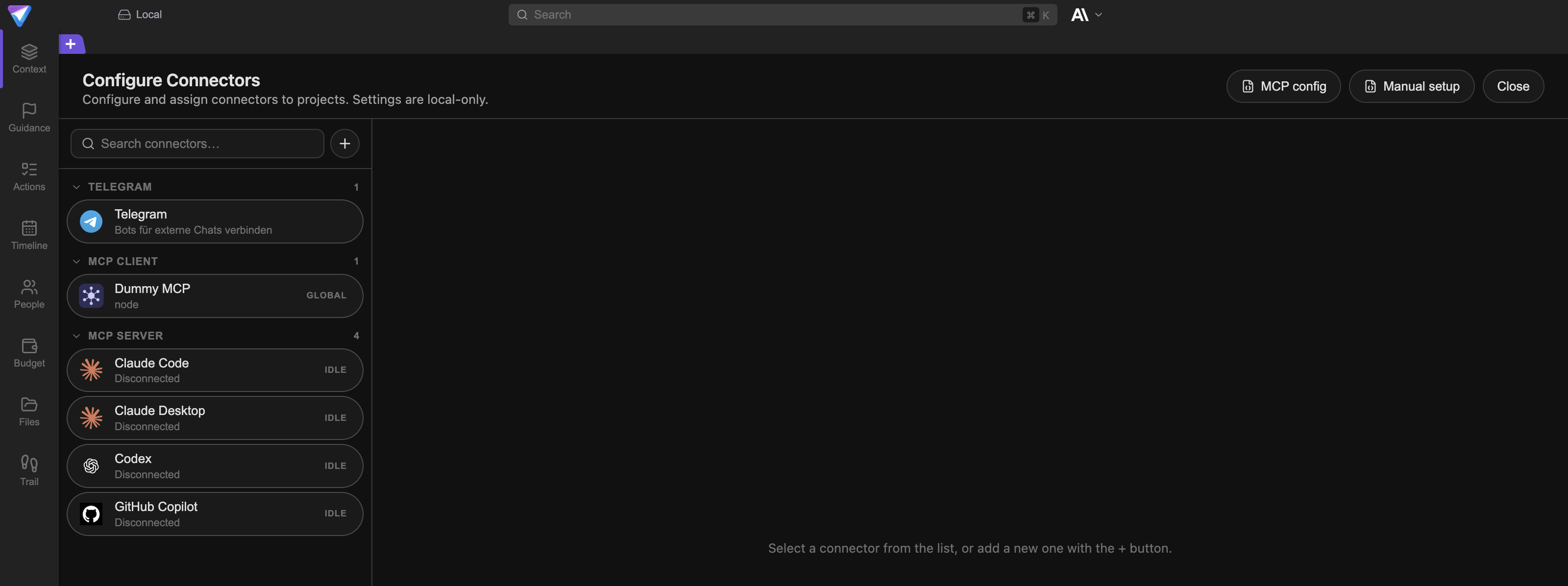
Connector sync failed
Symptom: After Sync now you get Connector sync failed. instead of the success message Sync complete: scanned {{scanned}}, imported {{imported}}, skipped {{skipped}}.
Likely cause: Credentials, folder selection or the network. The email connector often adds Credentials missing.
Fix:
- Open the connector and read the status badge.
RECONNECT,SIGN IN,SELECT FOLDERSandALLOW ACCESSeach say directly what is missing. - For the email connector check
IMAP Host,IMAP PortandIMAP Password / App Password. Many providers require a dedicated app password instead of your normal one. - Check
Initial Sync Lookback (days). If the value is small, TensorPM will not find older messages. - Run
Sync nowagain and read the counts in the success message.
If that does not help: If the success message reports many skipped messages, the connector itself is fine. The cause is then the folder selection or the automatic relevance check, see below.
Microsoft sign-in failed
Symptom: Microsoft sign-in failed. Please try again. or Reconnect failed. Please try again. The connector shows RECONNECT.
Likely cause: The Microsoft account authorisation expired or was revoked.
Fix:
- Open the
Microsoft 365connector and start the sign-in again. - Confirm every requested permission in the browser.
- Then check under
2. Assign projectsthat the assignment is still correct. - If you see
The calendar capability could not be updated., turn calendar access off, save, and turn it back on.
The local calendar or local mailbox is not read
Symptom: macOS Calendar access is not available. Grant full access in System Settings, then check again., The local calendars could not be read., macOS Calendar access could not be requested. or Could not scan for local mail apps. The connector shows Access missing.
Likely cause: macOS has not granted TensorPM access to your calendar or mailbox.
Fix:
- Open System Settings on your Mac and grant TensorPM full calendar access.
- For local email you also need access to the mail application's folder. Local email currently works with Apple Mail.
- Return to TensorPM and check the connector again.
- If you see
macOS could not open the Calendar permission prompt. This TensorPM build may not be signed correctly. Install a current build and try again., install the current version from the official source.
Signals arrive but nothing happens
Symptom: The sync reports imported messages, but the Incoming Signals panel stays empty or there are no Proposed Changes.
Likely cause: The messages were classified as not relevant, or they are hidden by a filter.
Fix:
- Open the
Incoming Signalspanel from the mailbox icon in the top bar. - Reset the
Filters:. Active filters such asChanges ProposedorNo Distillationshide entries. - Click
Show ignored signalsand review theIgnored Signalslist. The automatic relevance check marks entries there withAuto-filtered: {{reason}}. - If an entry does belong after all, choose
Include for distillationand thenOpen Distiller.
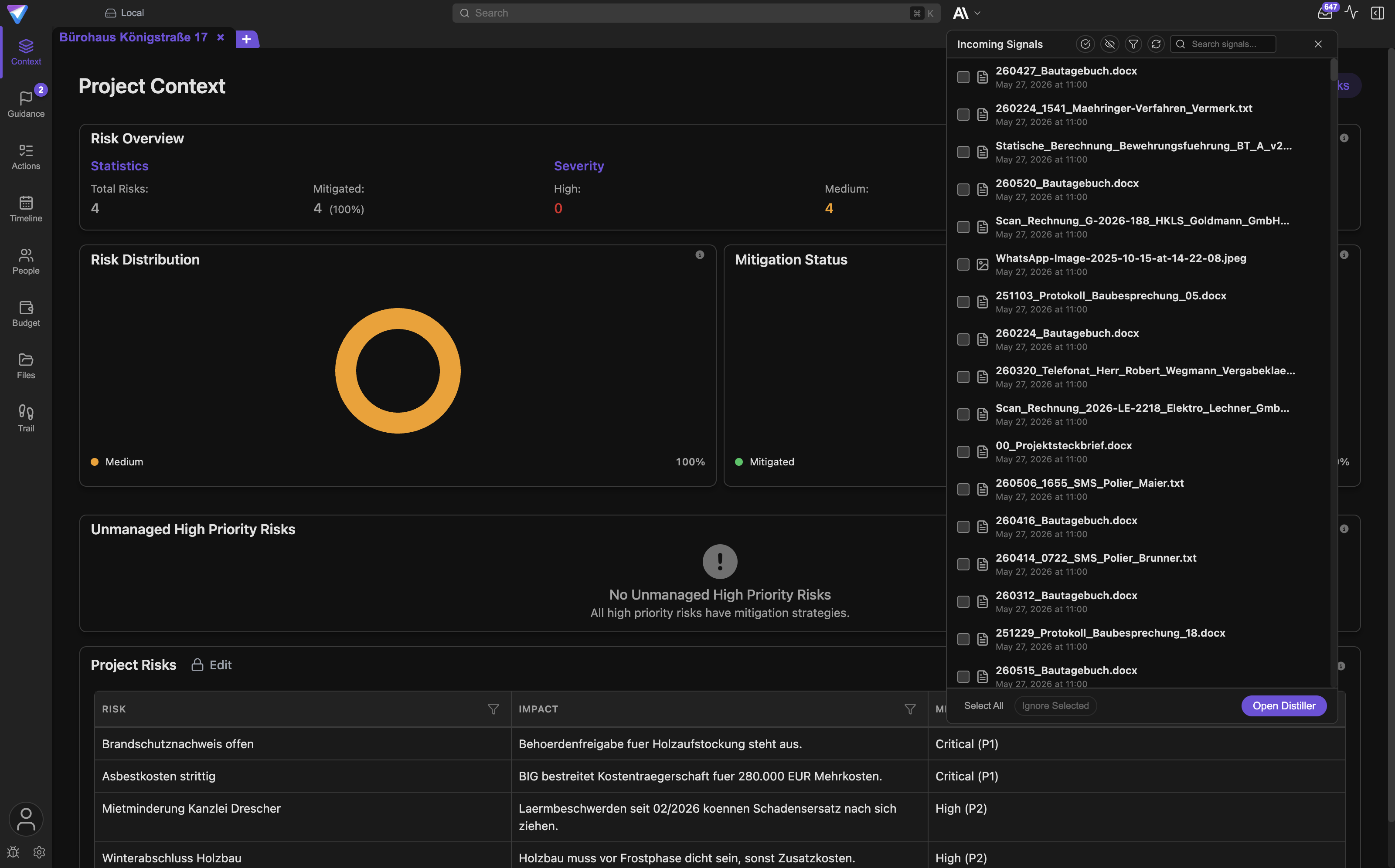
If that does not help: Messages such as Failed to open distiller or Failed to include item: {{error}} point to a processing problem. Note the text after the colon for support. More on the flow in Connectors & Approvals.
Sending email or applying a calendar event fails
Send failed
Symptom: The email card in the chat shows Send failed instead of Sent.
Likely cause: The sending route is not configured or was rejected. Receiving and sending are separate: a connector can read without being able to send.
Fix:
- Open the email connector and check
SMTP Host,SMTP PortandSMTP Password. The app's own hint reads:Leave SMTP password empty to reuse the IMAP password. Set SMTP host explicitly for custom mail providers. - Check that
Use SMTP TLS / SSLmatches what your provider requires. - Save the connector with
Update Connector. - On the email card click
Retry Send.
If that does not help: The approval is tied to that exact draft. Editing the text invalidates the old approval, so you have to choose Approve & Send again.
The calendar proposal cannot be applied
Symptom: The New Calendar Event or Calendar Event Change card stays on Applying… or shows an error.
Likely cause: The connector's calendar access is missing or expired.
Fix:
- Click
Retryon the card. - Check the connector. For Microsoft 365 calendar access must be enabled; for the local calendar macOS must have granted access.
- Then click
Approve & Applyagain. - If the proposal is wrong in substance, choose
Discard. You then get the messageCalendar proposal discarded.
If that does not help: The local calendar deliberately cannot do everything. The app puts it this way: Local calendars support reading, creating, and changing events. Event deletion and attendee changes are deliberately unavailable. A deletion request therefore fails permanently and is not a defect.
The draft shows Replaced
Symptom: An older email card reads Replaced and can no longer be approved.
Likely cause: A newer draft exists for the same message. TensorPM invalidates the old one on purpose so the same mail does not go out twice.
Fix:
- Scroll down in the chat to the newest card.
- Check recipient, subject and body there.
- Choose
Approve & Sendon the newest card.
Project data is missing or looks wrong
A project has disappeared
Symptom: A project no longer appears in the project selector.
Likely cause: Wrong workspace, an archived project, or a sync that has not finished.
Fix:
- Check the workspace selector on the start screen. A project always lives in exactly one workspace.
- Look for archived projects in the project selector.
- For a cloud project, check the sync status. If it reads
PendingorDisconnected, wait for the sync to finish. - Ask in your team whether someone moved or archived the project.
- Create a backup through
Settings->General->Database Backupbefore any recovery attempt.
A local workspace exists only on the device where it was created. Without a restored backup it is not visible on any second device. More in Workspaces.
Numbers or entries look wrong
Symptom: The view shows fewer entries than expected, or totals that do not add up.
Likely cause: An active filter, a hidden column, or a window that is too narrow.
Fix:
- First confirm you are in the right project and the right view.
- Open
Filter & Sortand clear every filter. - Check whether completed entries are hidden.
- Widen the window again. Narrow windows hide columns.
- Restart TensorPM if the view is still wrong afterwards.
A change was rolled back
Symptom: A value you just set jumps back to its previous state, along with a message saying the change was rolled back.
Likely cause: A rule rejected the change, for example the project limit, or saving failed.
Fix:
- Read the message.
Failed to saveandFailed to update status. Please try again.are simple retry cases. - For
Project limit reached, archive a project first. - Check under
Trail->Changeswhether the change arrived at all. How to read origin and timestamp there is covered in Files & Trail. - Set the value again and watch whether the message returns.
Files are not recognised or not summarised
Project folder unavailable
Symptom: Project folder unavailable, No project-specific folder configured, Could not open project folder. Please check your file system permissions. or Failed to update project folder. Please ensure the folder is accessible.
Likely cause: The folder was moved or renamed, it sits on a disconnected network drive, or the operating system denies access.
Fix:
- Open
Settings->Generaland see which project folder is configured. - Check in your file manager that this folder exists and is reachable.
- If it was moved, select the new location inside TensorPM. Do not edit internal paths by hand.
- Check that the operating system still grants TensorPM access to that location. Folders in cloud storage are sometimes only downloaded on demand.
- Then refresh the
Filesview.
The database backup and your project files are two separate things. A missing file will not reappear from a database backup.
Summarization failed
Symptom: An attachment in the chat shows Summarization failed instead of Summarization complete. Previews may show Failed to load PDF or Failed to load image preview.
Likely cause: The file is damaged, protected, very large, or the AI was unreachable while processing.
Fix:
- Open the file once outside TensorPM. If it will not open there either, the file is the problem.
- Remove the attachment and attach it again.
- For protected PDFs, check whether a password is set.
- If the AI is currently unavailable, fix that first, see above. For documents during project creation the matching message is
Document processing failed.
Attachments and documents are rejected
Symptom: Maximum {{count}} chat attachments reached. Remove a file in the chat first., Only {{count}} documents can be attached. {{dropped}} file(s) were not added. or a note that the token limit has been reached.
Likely cause: There are deliberate ceilings on the number and total size of attachments so the AI request does not overflow.
Fix:
- Remove an attachment the AI does not need for this question.
- Attach large documents one at a time instead of all at once.
- If you see
Could not read {{file}}. It was not added., that one file is the problem. Everything else was accepted. - Put bulky material into the project folder instead. TensorPM then works with it through the
Filesview.
An analysis will not start
I cannot find the Guidance view
Symptom: You are looking for the Guidance entry in the sidebar and it is not there.
Likely cause: That view was removed. Its two halves moved into the places where you already work.
Fix:
- Suggestions now live in the
Suggestionscard at the top of the right-hand column inPulse. - The recommended order of work is the
Ordertab inside theAction Itemsview. - All four analyses start from one button:
Review projectinPulse. - More on both in Suggestions & Order.
A project review reports skipped areas
Symptom: After Review project the message reads that one or more areas were skipped because their prerequisites are not met.
Likely cause: The analyses build on each other. Strategy and coverage need a context analysis rated Decent or better, coverage needs at least one action item, and the execution analysis needs at least two.
Fix:
- Work through the suggestions carrying the chip
Context. They name what is missing. - Fill those gaps in the
Contextarea: goal, scope, success criteria, timeframe, budget, milestones, risks. - Create action items if the project has fewer than two.
- Click
Review projectagain. As the rating rises, the skipped steps run.
Re-evaluate and Split are greyed out
Symptom: In Quick Actions, Re-evaluate and Split cannot be clicked. The tooltip reads Select items in edit mode to re-evaluate or Select items to split.
Likely cause: Both actions work on a selection. With nothing selected there is nothing to do.
Fix:
- Open
Actions->List. - Choose
Edit. - Select one or more action items. The panel then shows
{{count}} items selected. - Open Quick Actions again. More in AI Panel and Action Items.
If that does not help: If the project still lacks context, Context Analysis will get you further than anything else. It tells you exactly what is missing, for example Project scope is undefined or No success criteria defined.
A project check-in does not run
Symptom: After Run now you get Project check-in failed. or one of the more specific messages Project check-ins require Pro or Business., Archived projects cannot run check-ins., A check-in is already running or awaiting retry for this project. or AI is currently unavailable. Check your AI settings and try again.
Likely cause: Each message names it directly.
Fix:
- Check your plan. Check-ins belong to Pro and Business.
- Reactivate the project if it is archived.
- Wait if a check-in is already running.
- Fix the AI problem first if the AI is unavailable.
- If no notifications reach your screen, check your system notification settings. The app points this out:
System notifications must be allowed for TensorPM.Open settingstakes you straight there.
The project dashboard shows the state of the last check-in, for example Last check failed or Not checked · AI is unavailable. Try again starts it over.
The app is slow
Symptom: Views build slowly, typing lags, or AI answers arrive noticeably later than usual.
Likely cause: Too many operations at once, a very large project, or a sync catching up on many records.
Fix:
- Check whether an analysis, a skill run or a connector sync is running. Let those finish.
- Look at the sync details.
Pendingwith many entries means TensorPM is catching up. - Close views you do not need and hide the AI panel while you are not using it.
- Reduce the number of visible entries through
Filter & Sort. - Restart TensorPM. That also starts a fresh log session, which makes searching the logs easier later.
If that does not help: Open the log folder and look for repeating entries in sync.log and ai.log of the current session. Attach both files to your support request.
Exporting a support bundle and reporting a bug
A support bundle is a ZIP file with diagnostic data. It contains no passwords and no API keys, and by default it contains no AI prompts and no AI responses. Identifiers are obscured before export.
The route through the Info tab
- Open
Settingsfrom the gear icon at the bottom left, next to the account button. - Switch to the
Infotab. - For a bug report, click
Report BugunderMore. - For the file only, click
Export Support Bundle. During export it readsExporting.... - The file is named
tensorpm-support-<timestamp>.zipand lands in your downloads folder by default.
What the Report a Bug dialog asks for
Title: a short summary of the problem.Description: what happened, what you expected, and how to reproduce it.Severity:Lowfor a minor issue with a workaround,Mediumwhen functionality is affected,Highwhen a major feature is broken,Criticalwhen the app is unusable.Screenshot:Capture Screenshotattaches an image,Retakereplaces it. Make sure no confidential project data is visible.Include diagnostic data (Support Bundle): leave this on if you cannot explain the problem yourself. The app says:The support bundle includes system information, logs, and sync status.andSensitive data like API keys is not included.- Click
Submit Report. You then getBug Report Submittedand a lineReference: #<number>. Note that number.
If you see Could not include support bundle. Report will be submitted without diagnostics., the report still goes out. Export the bundle separately through Export Support Bundle in that case. If you see Failed to submit bug report., check your internet connection and try again.
What a good bug report contains
- the TensorPM version from
Settings->Info - your operating system and its version
- the affected workspace and whether it is local or cloud
- the exact steps to the error, numbered
- what you expected and what actually happened
- the literal text of the message, ideally via
Copy Error - the
Correlation IDfrom the technical details, if there is one - the reference number of an earlier report about the same topic
- whether the problem happens every time or only sometimes
- since when it happens and what changed before that, for example an update
What does not belong in a bug report
- passwords, access keys and tokens
- full customer or personal data that is not needed for the fault
- screenshots with confidential content
- support bundles you do not want to send. The toggle is optional.
Where the log files live
A log is a plain text file in which TensorPM records what it does. The quickest way to the folder is Settings -> Info -> Open Logs Folder.
Location by operating system
| System | Folder |
|---|---|
| macOS | ~/Library/Application Support/TensorPM/logs |
| Windows | %APPDATA%\TensorPM\logs, that is C:\Users\<username>\AppData\Roaming\TensorPM\logs |
| Linux | ~/.config/TensorPM/logs |
Inside there is a sessions folder. Every app start creates its own subfolder there, named by date and time in the format YYYY-MM-DD_HH-MM-SS. The folder with the newest timestamp belongs to the last session. Old sessions are cleaned up automatically after a while.
What the files contain
| File | Contents |
|---|---|
error.log |
every error in this session. Start here. |
system.log |
startup, shutdown, updates, operating-system events |
sync.log |
connection, uploads, downloads and sync issues |
ai.log |
AI requests, provider switches, limits and tool calls |
api.log |
calls to your TensorPM account and to external services |
database.log |
database access and migrations |
filesystem.log |
access to the project folder and to files |
general.log |
everything else |
For support, error.log is usually the right starting point, plus the file for the area concerned. The files contain project references but no passwords and no API keys. Even so, skim them before you send them.
Do not do this first
- do not delete app data
- do not restore an old database without a fresh backup
- do not move internal files while TensorPM is running
- do not paste passwords, tokens or API keys into a bug report
- do not keep editing the same cloud record on several devices during a sync error
- do not change several settings at once
Next steps
- Back up and restore safely: Settings & Backups
- Understand sync states in detail: Cloud Sync
- Understand keys and the keyring: Encryption
- Check providers and plans: Account & AI Modes
- Set up connectors and understand approvals: Connectors & Approvals
- Remove the app: Uninstall
- Report a bug: https://tensorpm.com/bug-report
- General question: https://tensorpm.com/contact